


Lab Information
The lab is open during regular hours and offers access to specialized software, including Toon Boom Storyboard Pro, Toon Boom Harmony & Adobe Creative Cloud.
For a complete list of available software, see:
Other helpful software-related links:
Available Equipment
-
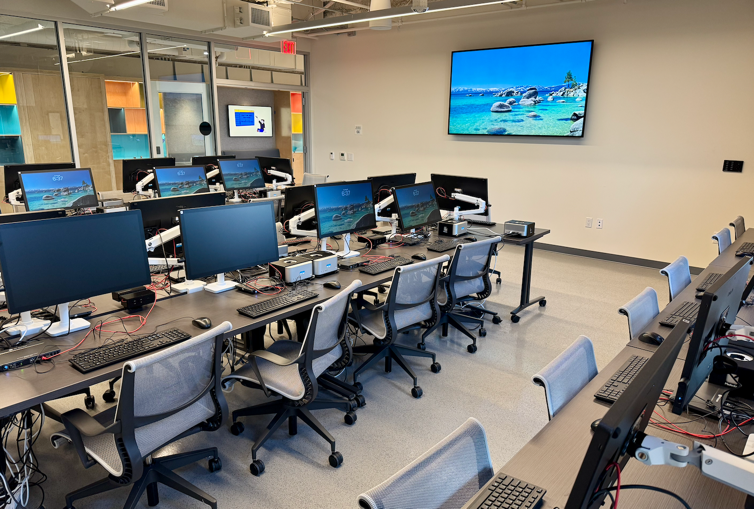
23 Apple Mac Studio
-
23 Windows Workstations
-
23 Wacom Cintiq 24 Touch ( DTH246K0A )
- Projector - [ View Projection Setup Instructions ]
-
Speaker available at the teacher's station
-
Xerox Color Printer ( C8000 ) – supports Letter & Tabloid sizes - [ Guide on printing and copying ]
-
Epson Flatbed Scanners Tabloid size - [ Instructions on how to scan ]
-
23 Lab chairs
Teacher Station
-
Computer #06 [ Personal devices are not supported ]
How to Get Help:
-
For assistance, refer to the guide: Otis College Helpdesk Portal
Additional Resources
Looking for information about other classrooms or computer labs? Visit the Classroom Features page for a complete list of instructional spaces and links to their individual technology and equipment pages.
If you need assistance with the computers, software, printing, or classroom technology, please contact the IT Help Desk.
-
IT Staff: Available during regular business hours
-
Student Technicians: Available during standard lab hours
📧 Email: [email protected]
📞 Phone: (310) 665-6825
🌐 Help Desk Portal: helpdesk.otis.edu
Last Updated: July 13, 2026
Maintained by: IT Department – End User Computing Team

