


 6871
6871
You can add OWL Dollars to your account online via a mobile app, web browser, or in person at a deposit terminal using cash or a credit card.
Option One: Add Funds to OWL Dollars using a Web browser or Mobile app
Via Web Browser
[ If you are an extension student and were not given an email address, please see the Note section below ]
-
Go to: https://www.otis.edu/get
(Direct link: https://get.cbord.com/otiscollege/full/prelogin.php) -
Click the link to login to GET.
-
Enter your bank, debit, or credit card information.
-
Select + Add Funds to complete your deposit.
NOTE
If you are a parent, guardian, or other relative adding funds to a student’s account, or if you are an extension student & were not given an email address, please use the Guest Deposit feature or the deposit terminals (see Option Two for deposit terminal information).
Access the Guest Deposit page here:
https://get.cbord.com/otiscollege/full/guest_deposit.php
To add funds, you will only need the student’s ID (X number), last name, and date of birth.
Note for Extension Students: Enter your Xnumber exactly as it appears on your photo ID, using all uppercase letters (it begins with “X2”).
If you do not know your "X2" number, you can find it in the Extension Student Portal, on your student ID, or by contacting the Extension office for assistance.
Using a Mobile App
-
Download the GET mobile app from your device’s app store:
Apple App Store https://apps.apple.com/us/app/get-mobile/id844091049
Google Play Store https://play.google.com/store/apps/details?id=com.cbord.get

- Connect to Otis College by clicking SEARCH ALL INSTITUTIONS
- Add your bank/debit/credit card information
- You can now transfer funds to GET
Option Two: Add Funds to OWL Dollars via a deposit terminals
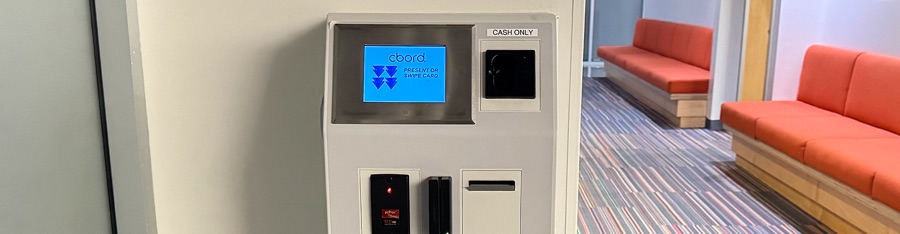
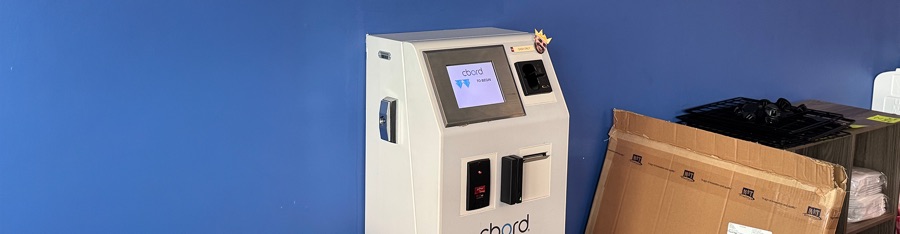
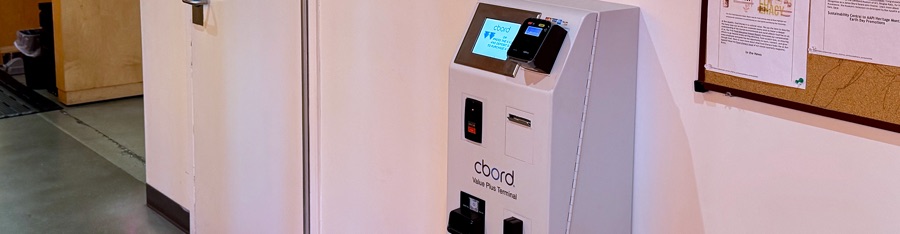
Cash-only deposit terminals are available on the 2nd floor of Ahmanson and in the Student/OWL Lounge. A deposit terminal that accepts both cash and credit cards is located in the Main Cafeteria, next to Elaine’s.
Note:
If you are an extension student, an Otis email account is needed to check your OWL Dollar balance online. Without one, you must use one of the three deposit terminals to view your balance.
Terminal 1 location: Ahmanson Building, 2nd Floor
Payment Type: Cash Only
Terminal 2 location: Student/OWL Lounge
Payment Type: Cash Only
Terminal 3 location: Main Cafeteria ( Adjacent to Elaine's )
Payment Type: Cash & Credit Card
Need Assistance?
For additional support, please reach out to the IT Help Desk:
IT staff are available during regular business hours, while student technicians are available during standard lab hours.
📧 [email protected]
📞 (310) 665-6825
🌐 helpdesk.otis.edu
Last Updated: February 23rd, 2026
Maintained by: IT Department – End User Computing Team

